> ## Documentation Index
> Fetch the complete documentation index at: https://docs.rynopay.io/llms.txt
> Use this file to discover all available pages before exploring further.
# Wallet Details
> Review wallet balances, status, linked account, actions, and transaction history.
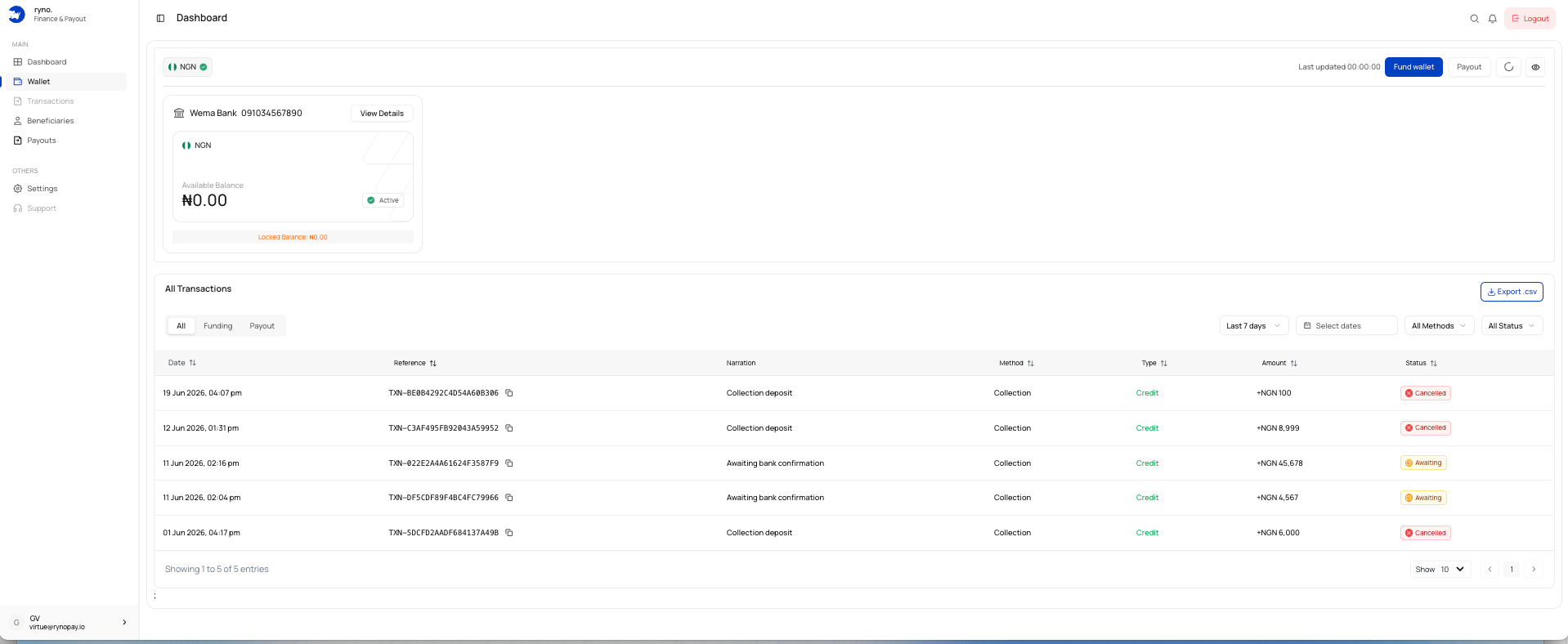 The wallet details page shows:
* Currency and wallet status
* Available and locked balances
* Linked bank account
* Last updated time
* Fund wallet and payout actions
* Transaction history
## Available balance
The amount currently available for supported wallet actions.
## Locked balance
Funds temporarily reserved, processing, or unavailable.
## Actions
* **Fund wallet** — add money using an available funding method.
* **Payout** — begin a payout where enabled.
* **View Details** — open linked account information.
* **Refresh** — update balances and transactions.
* **Visibility control** — show or hide balances.
A locked balance does not necessarily indicate a failed transaction.
## Related guides
The wallet details page shows:
* Currency and wallet status
* Available and locked balances
* Linked bank account
* Last updated time
* Fund wallet and payout actions
* Transaction history
## Available balance
The amount currently available for supported wallet actions.
## Locked balance
Funds temporarily reserved, processing, or unavailable.
## Actions
* **Fund wallet** — add money using an available funding method.
* **Payout** — begin a payout where enabled.
* **View Details** — open linked account information.
* **Refresh** — update balances and transactions.
* **Visibility control** — show or hide balances.
A locked balance does not necessarily indicate a failed transaction.
## Related guides